A computer system comprises hardware and software components, aiming to offer a powerful computational tool. These systems play a crucial role across diverse domains, aiding us in numerous tasks. The prevalence of the internet has significantly bolstered the utilization of computers for information sharing and communication. Computer systems empower us to store, process, display, and transmit information. Even in a basic modern computer system, multiple programs are typically required to carry out various functions effectively.

Showing posts with label memory. Show all posts

Thursday, March 2, 2023

Solid-state drive (SSD)

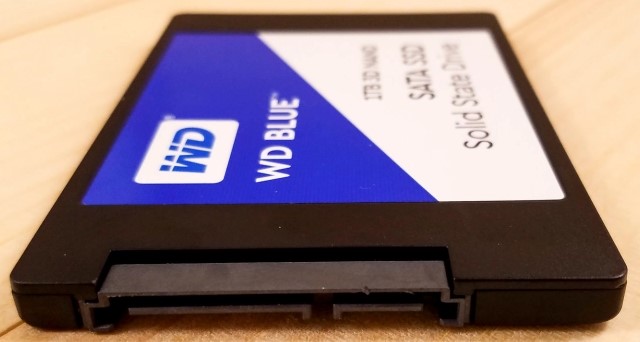
SSD drives use what is called “solid state” memory. An SSD, or solid-state drive, is a type of storage device used in computers. This non-volatile storage media stores persistent data on solid-state flash memory.

The flash memory inside an SSD means data is written, transferred, and erased electronically and silently — SSDs do not have the moving parts found inside mechanical hard-disk drives (HDDs).

SSDs are much faster than hard drives since they use integrated circuits. SSDs use a special type of memory circuitry called non-volatile RAM (NVRAM) to store data, so everything stays in place even when the computer is turned off.

SSDs are lighter in weight than HDDs, use less power, and have virtually no vibration - due to no moving parts. They can also survive an accidental drop better than an HDD.

While HDDs are traditional storage devices with spinning platters that read and write data, SSDs use newer technology that stores data on instantly accessible memory chips.

SSDs are often used on high-end machines or as secondary storage devices inside consumer PCs.
Solid-state drive (SSD)
Tuesday, October 11, 2022

Read-only memory (ROM)

Memory is the most essential element of a computing system because without it computer can’t perform simple tasks. Computer memory is of two basic types – Primary memory(RAM and ROM) and Secondary memory (hard drive, CD, etc).

ROM devices are used for storage of data that does not require modification. ROM stands for Read-Only Memory. It is a non-volatile memory that is used to stores important information which is used to operate the system. Non-volatile memory (NVM) is a type of computer memory that has the capability to hold saved data even if the power is turned off. Unlike volatile memory, NVM does not require its memory data to be periodically refreshed

While RAM is volatile memory that temporarily stores the files when user is working on, ROM is non-volatile memory that permanently stores instructions for computer.

ROM contains the programming needed to start a computer, which is essential for boot-up; it performs major input/output tasks and holds programs or software instructions.

The memory does not depend on an electric current to save data, instead, data is written to individual cells using binary code. Non-volatile memory is used for parts of the computer that do not change, such as the initial boot-up portion of the software, or the firmware instructions that make the printer run.

Types of Read-Only Memory (ROM):
*MROM (Masked read-only memory)
*PROM (Programmable read-only memory) - It can be programmed by the user. Once programmed, the data and instructions in it cannot be changed.
*EPROM (Erasable programmable read-only memory)
*EEPROM (Electrically erasable programmable read-only memory) - The data can be erased by applying an electric field, with no need for ultraviolet light.
Read-only memory (ROM)

Tuesday, April 19, 2022

Primary memory

Memory is physically organized as a large number of cells that are capable of storing one bit each. Primary memory is comprised of DRAM (Dynamic RAM) and provides the actual working space to the processor. Primary memory is also known as Main memory or Internal memory, is the area in a computer which stores data and information for fast access.

Primary memory is the main memory of the computer which can be directly accessed by the central processing unit, whereas Secondary memory cannot be accessed directly by a CPU or processor. Secondary memory refers to the external storage device which can be used to store data or information permanently. The memory devices used for primary memory are semiconductor memories.

Generally, primary memory has a storage capacity lesser than secondary memory and greater than cache memory.

As soon as a computer starts, primary memory loads all running applications, including the base operating system (OS), user interface and any user-installed and running software utility. A program/application that is opened in primary memory interacts with the system processor to perform all application-specific tasks.

Random Access Memory (RAM) is primary-volatile memory and Read-Only Memory (ROM) is primary-non-volatile memory. The processor accesses all memory addresses directly, irrespective of word length, making storage and retrieval fast. RAM is the fastest memory available and hence most expensive.
Primary memory

Monday, March 14, 2022

Cache Memory

Cache Memory is a chip-based computer component that makes retrieving data from the computer's memory more efficient. Cache memory provides high-speed data access to a processor and stores frequently used computer programs, applications and data.

Memory caching (or caching) is a technique in which computer applications temporarily store data in a computer's main memory (i.e., random access memory, or RAM) to enable fast retrievals of that data.

Cache holds a copy of only the most frequently used information or program codes stored in the main memory.

When the user is working on a video project, the video editor may load specific video clips and audio tracks from the hard drive into RAM. Since RAM can be accessed much more quickly than a hard drive, this reduces lag when importing and editing files.

Cache memory is an extremely fast memory type that acts as a buffer between RAM and the CPU. It holds frequently requested data and instructions so that they are immediately available to the CPU when needed.

Caching is especially efficient when the application exhibits a common pattern in which it repeatedly accesses data that was previously accessed.

There are three general cache levels:
*Level 1 (L1) cache, or primary cache, is extremely fast but relatively small
*Level 2 (L2) cache, or secondary cache, is often more capacious than L1
*Level 3 (L3) cache is specialized memory developed to improve the performance of L1 and L2
Cache Memory

Monday, January 31, 2022

Volatile memory

Memory is one of the fundamental components of a system. In computing, memory refers to the devices used to store information for use in a computer. There is at least some form of memory in a system.

Volatile memory is a type of memory that loses its content when the system’s power is turned off. The primary example is the computer's main memory, which is made up of dynamic RAM (DRAM) and static RAM (SRAM) chips.

SRAM retains its contents as long as the power is connected and is easy to interface to but uses six transistors per bit. Dynamic RAM is more complicated to interface to and control and needs regular refresh cycles to prevent its contents being lost.

RAM (Random Access Memory) is volatile memory that temporarily stores the files the user is working on. When the user is working on a document, it is kept in RAM. If the computer he is using is disconnected from power, his work is lost because it was not stored in permanent (non-volatile) memory.

Volatile memory is typically faster than nonvolatile memory, so typically when operating on the data it's faster to do it on volatile memory. However, it is also more expensive. Computers use volatile and non-volatile memory to help balance cost with performance.

Volatile memory loses data, the mechanism to retain data in volatile memory is to keep refreshing the data content. By refreshing, we mean to read the data and write it back in cycle.
Volatile memory

Thursday, December 9, 2021

Computer memory

Computer memory is the storage space in computer where data is to be processed and instructions required for processing are stored. The term "memory", meaning "primary storage" or "main memory", is often associated with addressable semiconductor memory, i.e. integrated circuits consisting of silicon-based transistors, used for example as primary storage but also other purposes in computers and other digital electronic devices.

Memory plays an important role in saving and retrieving data. The performance of the computer system depends upon the size of the memory.

Memory size refers to the size of the RAM (Random Access Memory) and the mass storage - usually magnetic hard disks.

There are two main types of semiconductor memory
*Volatile/Primary memory
*Non-volatile/Secondary memory

Secondary memory or non-volatile memory is external and permanent in nature. The secondary memory is concerned with magnetic memory. Examples of non-volatile memory are flash memory (used as secondary memory) and ROM, PROM, EPROM and EEPROM memory (used for storing firmware such as BIOS).

Primary Memory is internal memory of the computer. Examples of primary/volatile memory are primary storage, which is typically dynamic random-access memory (DRAM), and fast CPU cache memory. The primary memory provides main working space to the computer.

Memory can be classified to:
· Random access memories (RAM)
· Sequentially accessible memory (SAM)
· Direct access memory (DAM)
· Contents addressable memory (CAM)
Computer memory

Sunday, September 13, 2015

In-memory database

In-memory databases do not use any file to store any kind of information, the databases and their logs are stored entirely in the main memory. So, the database operations are superfast. When the application closes an in-memory database, the database is eliminated from the main memory.

In-memory database management systems have the potential to reduce the execution time of complex operational analytical queries to the order of seconds while executing business transaction in parallel.

Since in-memory database utilize the server’s main memory as primary storage location, the size, cost and access speed provided by main memory components are vitally important.

With the help of data compression, today’s standard server systems comprise sufficiently large main memory volumes to accommodate the entire operation data of all companies.

Main memory, as the primary storage location is, nevertheless, becoming increasingly attractive as a result of the decreasing cost/size ratio.

The In-Memory Database (IMDB) technology has proven to have major capabilities for analyzing big enterprise and medical data, e.g., to identify relevant patient data and to protect markets from injecting pharmaceutical counterfeits.
In memory database

The Most Popular Posts

  • Carrageenan is a natural carbohydrate extracted from certain species of red seaweed and is widely used as a thickening, gelling, and stabilizing agent in...
  • Niacin deficiency, known in its severe form as pellagra, is a preventable but potentially serious condition that arises when the body lacks adequate vitami...