RAM is the hardware location in a computer where the operating system, application programs, and data in current use are kept so that they can be quickly reached by the computer's processor. RAM is acronym used for Random Access Memory. RAM is much faster to read from and write to than most other kinds of storage in a computer (the hard disk, floppy disk, and CD-ROM).
When the user opens an application, it is loaded into RAM. RAM can be compared to a person's short-term memory and the hard disk to the long-term memory. The short-term memory focuses on work at hand, but can only keep so many facts in view at one time.
When the user saves a file and close the application, the file is written to the specified storage device, and then it and the application are purged from RAM.
Without RAM it becomes impossible to get very far, from the moment the PC is turned ON. The software applications installed on the computer depends largely on the RAM. It is responsible for holding the data while any application is running. Once the application is closed without saving, the data gets lost.
RAM is called "random access" because any storage location can be accessed directly. Externally, RAM is a chip that comes embedded in a personal computer motherboard with a variable amount of additional modules plugged into motherboard sockets. To add memory to the computer, just simply add more RAM modules in a prescribed configuration.
Whether it comes from permanent storage (the hard drive) or input (the keyboard), most data goes in random access memory (RAM) first. The CPU then stores pieces of data it will need to access, often in a cache, and maintains certain special instructions in the register.
The opposite of RAM is Serial Access Memory (SAM). SAM stores data as a series of memory cells that can only be accessed sequentially. If the data is not at the current location, each memory cell is checked until the needed data is found.
System RAM
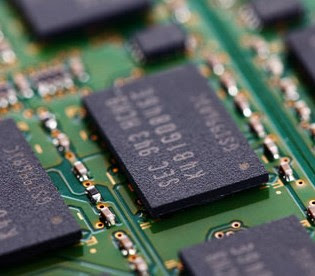
A computer system comprises hardware and software components, aiming to offer a powerful computational tool. These systems play a crucial role across diverse domains, aiding us in numerous tasks. The prevalence of the internet has significantly bolstered the utilization of computers for information sharing and communication. Computer systems empower us to store, process, display, and transmit information. Even in a basic modern computer system, multiple programs are typically required to carry out various functions effectively.
Showing posts with label computer memory. Show all posts
Friday, January 7, 2022
Thursday, December 9, 2021
Computer memory
Computer memory is the storage space in computer where data is to be processed and instructions required for processing are stored. The term "memory", meaning "primary storage" or "main memory", is often associated with addressable semiconductor memory, i.e. integrated circuits consisting of silicon-based transistors, used for example as primary storage but also other purposes in computers and other digital electronic devices.
Memory plays an important role in saving and retrieving data. The performance of the computer system depends upon the size of the memory.
Memory size refers to the size of the RAM (Random Access Memory) and the mass storage - usually magnetic hard disks.
There are two main types of semiconductor memory
*Volatile/Primary memory
*Non-volatile/Secondary memory
Secondary memory or non-volatile memory is external and permanent in nature. The secondary memory is concerned with magnetic memory. Examples of non-volatile memory are flash memory (used as secondary memory) and ROM, PROM, EPROM and EEPROM memory (used for storing firmware such as BIOS).
Primary Memory is internal memory of the computer. Examples of primary/volatile memory are primary storage, which is typically dynamic random-access memory (DRAM), and fast CPU cache memory. The primary memory provides main working space to the computer.
Memory can be classified to:
· Random access memories (RAM)
· Sequentially accessible memory (SAM)
· Direct access memory (DAM)
· Contents addressable memory (CAM)
Computer memory
Memory plays an important role in saving and retrieving data. The performance of the computer system depends upon the size of the memory.
Memory size refers to the size of the RAM (Random Access Memory) and the mass storage - usually magnetic hard disks.
There are two main types of semiconductor memory
*Volatile/Primary memory
*Non-volatile/Secondary memory
Secondary memory or non-volatile memory is external and permanent in nature. The secondary memory is concerned with magnetic memory. Examples of non-volatile memory are flash memory (used as secondary memory) and ROM, PROM, EPROM and EEPROM memory (used for storing firmware such as BIOS).
Primary Memory is internal memory of the computer. Examples of primary/volatile memory are primary storage, which is typically dynamic random-access memory (DRAM), and fast CPU cache memory. The primary memory provides main working space to the computer.
Memory can be classified to:
· Random access memories (RAM)
· Sequentially accessible memory (SAM)
· Direct access memory (DAM)
· Contents addressable memory (CAM)
Computer memory
Subscribe to:
Posts (Atom)
The Most Popular Posts
-
Hypermedia is an acronym which combines the words ‘hypertext’ and ‘multimedia’. Hypermedia has its root in hypertext. It is an augmented hyp...
-
Two risks related to network and the internet are unauthorized access and unauthorized use. The unauthorized use of computer systems and net...
-
A spreadsheet is a group of values and other data organized into rows and columns, similar to the ruled paper worksheets traditionally used ...
-
Accuracy of a computer is consistently high and the degree of accuracy of a particular computer depends on the instructions and the type of ...
-
Database software is a program that controls the structure of database and access to the data. In other words, a database is any electronica...